Check access before you start
Apply URL is not available to every employer by default. Indeed reviews eligibility, the job and application destination, and business need. Its guidance also requires traffic tracking; some applications may require sponsorship. Confirm those requirements with Indeed before publishing.
1. Get your lemonly job link
- Sign in to lemonly and open your role.
- Starting a new role? Choose Create role, add the role details, check the requirements, set up the chat interview, then review and create it.
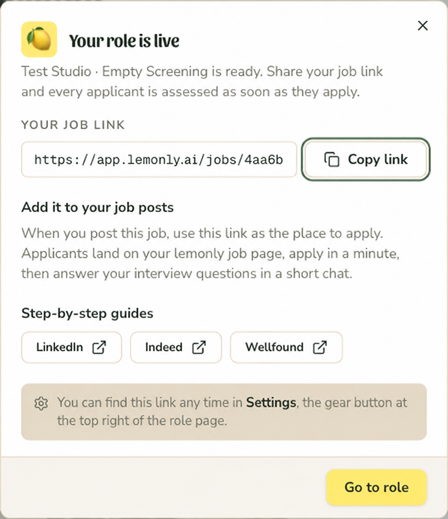
- In the Your role is live panel, choose Copy link.
Already closed that panel? Open the role, choose Settings using the gear button at the top right, then choose Copy beside the job link at the top of Role settings.
Copy the public job link from lemonly, rather than the address of your private role report.
2. Add it to Indeed
Ask Indeed to enable Apply URL
Contact Indeed employer support and explain that you want candidates to complete this role’s application on your lemonly job page. Wait for Indeed to confirm access and any tracking requirements.
Open or edit your job
Once access is enabled, create a job in your Indeed employer account or edit the existing posting. Find Application method.
Add the external application link
Turn off Receive applications on Indeed. Paste your full lemonly job link into the website URL field that appears.
Save and check the destination
Review the details and any sponsorship settings, then save or post when ready. Open the candidate-facing listing and check where Apply leads.
3. Check the destination
The application destination should open the correct lemonly role. If the website URL field is missing, contact Indeed about Apply URL access before proceeding.
Confirm the role title, company and application page look right. You can check the destination without submitting an application.
If your screen looks different
Adding a link to the description is not the same as configuring Apply URL. If your account is not eligible, ask Indeed which application options it supports for your job.
Labels and available options can vary by account. The official guides below can help you find the equivalent settings.
Official platform guides
Need help with your lemonly link? Get in touch.